Component Get Name
Overview
Get Name is a command for retrieving the name and full file path of a selected component in an Inventor assembly. This tool is useful for quickly identifying components, managing files, and streamlining workflows that require precise component references.
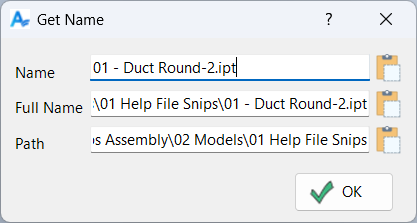
After you select a component, a dialog opens displaying both the component name and its full path. You can use the copy to clipboard button to easily copy either value for use in other dialogs, documentation, or file management tasks.
Getting the name of a component is especially helpful when you need to paste the name into an Inventor dialog box or quickly locate the file in your workspace without searching manually.
Samples
Sample files are located in C:\ProgramData\Autodesk\ApplicationPlugins\ArpaFlow.AssemblyTools.Core.Bundle\Samples. See Samples Summary
In the sample below, a duct fitting was selected after executing the Get Name command. The resulting dialog displays the component’s file name, full file path, and full path with file name. Each field includes a dedicated button to copy its contents to the clipboard, making it easy to reference or share component details.